卷不动了,真的卷不动了,OWL也来砸Manus的场子了
昨天刚介绍完艾莉同学,今天就又来个OWL,我出教程都有点扛不住了,每天写稿都要写到凌晨以后,卷不动,实在是卷不动了。好想找个AI帮我写,各位看官有推荐的吗,介绍给我试试!!!
一、OWL是啥?
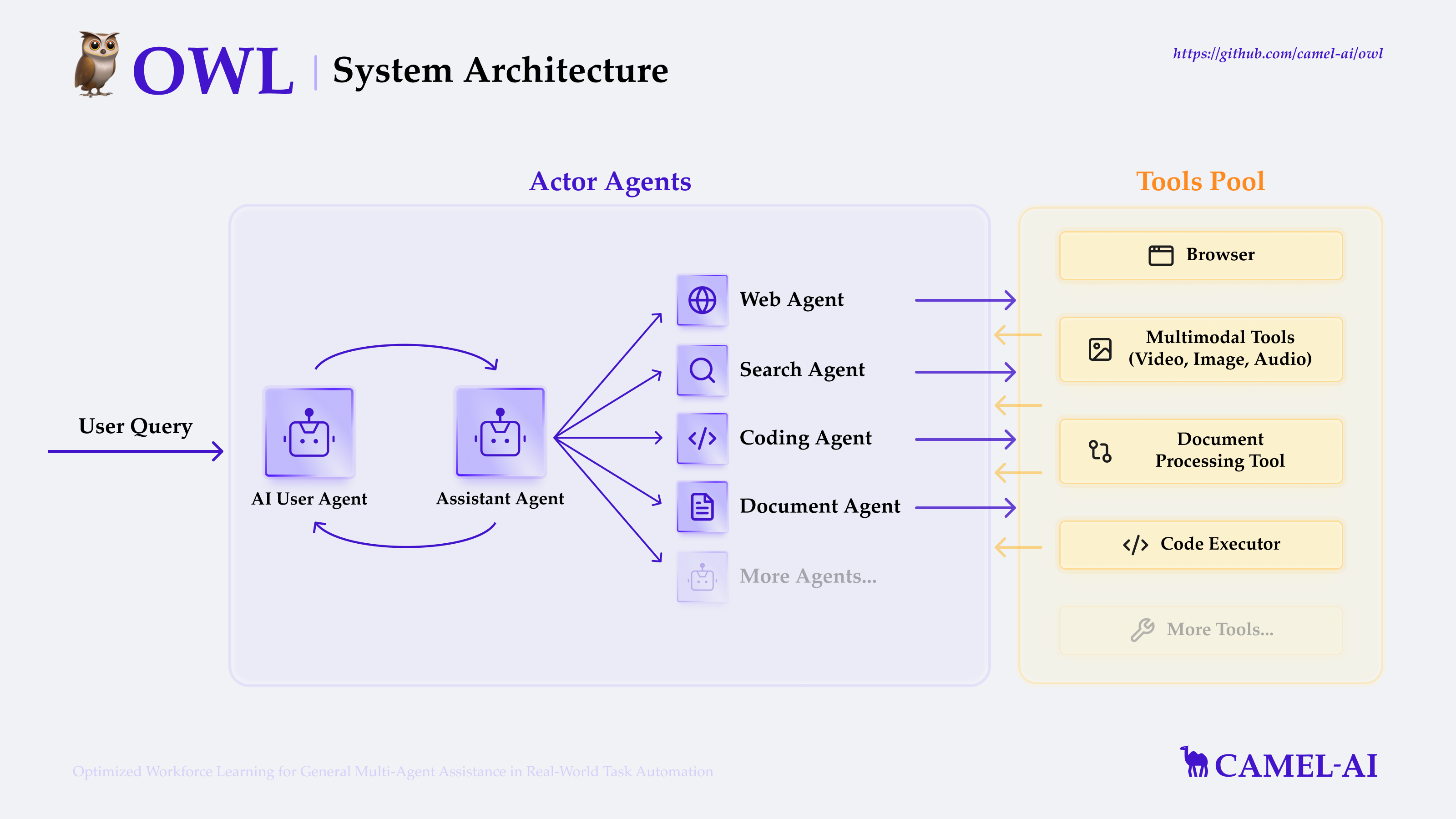
OWL跟Manus一样,都是一个的多智能体协作框架,通过利用动态智能体交互,实现跨领域,自然、高效且稳健的自动执行任务。
根据官网描述:OWL 在 GAIA 基准测试中取得 58.18 平均分,在开源框架中排名 🏅️ #1!
这么来说还是蛮牛逼的,具体架构如下:
二、入门指南
我是基于Windows11来操作的,如果想少走弯路,一把在自己电脑上跑起来,请务必跟随我的步骤来!
1. 环境准备
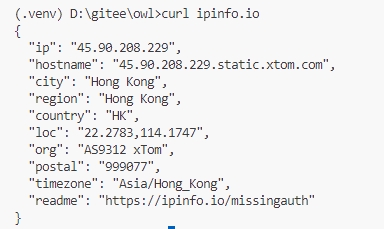
官网推荐用UV,之前有帖子讲过怎么安装,不懂的可以上官网:https://docs.astral.sh/uv ,由于安装都需要有外网,所以建议最好做全局代理,然后终端也加个代理,方便后面安装python,然后在你的终端执行如下命令:curl ipinfo.io ,出现外网地址则表示成功。
# 克隆 GitHub 仓库
git clone https://github.com/camel-ai/owl.git

# 进入项目目录
cd owl

# 创建虚拟环境并安装依赖
# 我们支持使用 Python 3.10、3.11、3.12
# 注意,这里最好要用3.10的版本,我之前用的3.12结果出现了些奇怪的问题
uv venv .venv --python=3.10

# 激活虚拟环境
.venv\Scripts\activate

# 安装 CAMEL 及其所有依赖(python3.12的版本在这里安装依赖可能会出错)
uv pip install -e .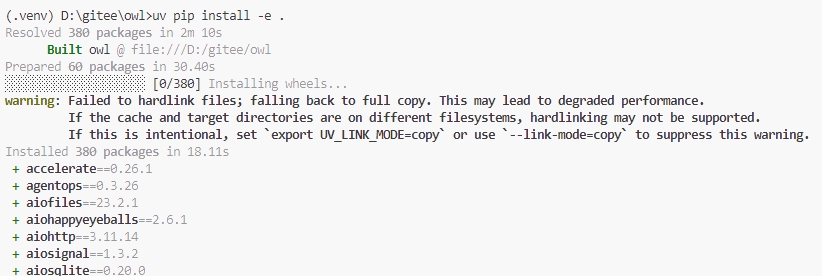
2. 修改配置
在owl目录下复制.env.example,并重命名为.env。
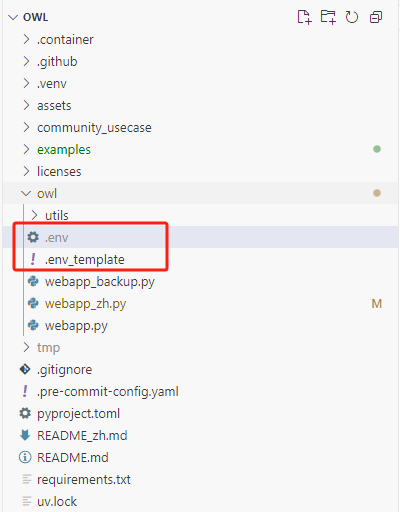
我这边演示用是硅基流动的API,注册地址:https://cloud.siliconflow.com/i/0hq76Lbt ,只需要如下配置即可。
# SILICONFLOW API
SILICONFLOW_API_KEY='sk-********z'

# Google Search API (https://coda.io/@jon-dallas/google-image-search-pack-example/search-engine-id-and-google-api-key-3)
GOOGLE_API_KEY='AI********A'
SEARCH_ENGINE_ID='a********0'

# Chunkr API (https://chunkr.ai/)
CHUNKR_API_KEY='ch_********'

# Firecrawl API (https://www.firecrawl.dev/)
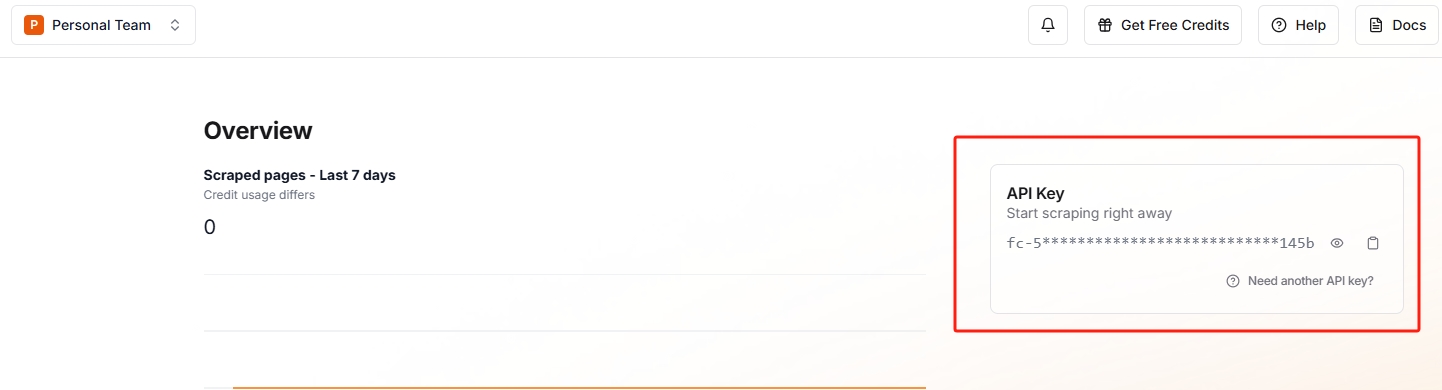
FIRECRAWL_API_KEY='fc-********'
#FIRECRAWL_API_URL="https://api.firecrawl.dev"
接下来我们需要修改代码,官方其实是支持供硅基流动的API的,可以看到官方源码里面是包含了硅基流动的API地址的,所以我们的配置文件里面不用填写URL,只需要配置API_KEY就行。
官方的例子:https://github.com/camel-ai/camel/blob/master/examples/models/siliconflow_model_example.py
由于官方的示例里面没有硅基流动,所以需要们自己加一个。在examples里复制run_mini.py并重命名为run_silicon_flow.py
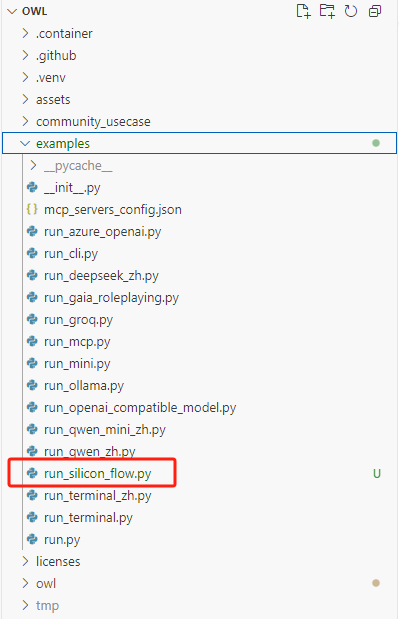
run_silicon_flow.py
# ========= Copyright 2023-2024 @ CAMEL-AI.org. All Rights Reserved. =========
# Licensed under the Apache License, Version 2.0 (the "License");
# you may not use this file except in compliance with the License.
# You may obtain a copy of the License at
#
#     http://www.apache.org/licenses/LICENSE-2.0
#
# Unless required by applicable law or agreed to in writing, software
# distributed under the License is distributed on an "AS IS" BASIS,
# WITHOUT WARRANTIES OR CONDITIONS OF ANY KIND, either express or implied.
# See the License for the specific language governing permissions and
# limitations under the License.
# ========= Copyright 2023-2024 @ CAMEL-AI.org. All Rights Reserved. =========
import sys
from dotenv import load_dotenv

from camel.models import ModelFactory
from camel.toolkits import (
    SearchToolkit,
    BrowserToolkit,
    FileWriteToolkit,
)
from camel.types import ModelPlatformType, ModelType
from camel.logger import set_log_level

from owl.utils import run_society

from camel.societies import RolePlaying

import pathlib

base_dir = pathlib.Path(__file__).parent.parent
env_path = base_dir / "owl" / ".env"
load_dotenv(dotenv_path=str(env_path))

set_log_level(level="DEBUG")


def construct_society(question: str) -> RolePlaying:
    r"""Construct a society of agents based on the given question.

    Args:
        question (str): The task or question to be addressed by the society.

    Returns:
        RolePlaying: A configured society of agents ready to address the
            question.
    """

    # Create models for different components
    models = {
        "user": ModelFactory.create(
            model_platform=ModelPlatformType.SILICONFLOW,
            model_type="Qwen/QwQ-32B",
            model_config_dict={"temperature": 0},
        ),
        "assistant": ModelFactory.create(
            model_platform=ModelPlatformType.SILICONFLOW,
            model_type="Qwen/QwQ-32B",
            model_config_dict={"temperature": 0},
        ),
        "browsing": ModelFactory.create(
            model_platform=ModelPlatformType.SILICONFLOW,
            model_type="Qwen/Qwen2.5-VL-72B-Instruct",
            model_config_dict={"temperature": 0},
        ),
        "planning": ModelFactory.create(
            model_platform=ModelPlatformType.SILICONFLOW,
            model_type="Qwen/QwQ-32B",
            model_config_dict={"temperature": 0},
        ),
    }


    # Configure toolkits
    tools = [
        *BrowserToolkit(
            headless=False,  # Set to True for headless mode (e.g., on remote servers)
            web_agent_model=models["browsing"],
            planning_agent_model=models["planning"],
        ).get_tools(),
        SearchToolkit().search_duckduckgo,
        SearchToolkit().search_wiki,
        *FileWriteToolkit(output_dir="./").get_tools(),
    ]

    # Configure agent roles and parameters
    user_agent_kwargs = {"model": models["user"]}
    assistant_agent_kwargs = {"model": models["assistant"], "tools": tools}

    # Configure task parameters
    task_kwargs = {
        "task_prompt": question,
        "with_task_specify": False,
    }

    # Create and return the society
    society = RolePlaying(
        **task_kwargs,
        user_role_name="user",
        user_agent_kwargs=user_agent_kwargs,
        assistant_role_name="assistant",
        assistant_agent_kwargs=assistant_agent_kwargs,
    )

    return society


def main():
    r"""Main function to run the OWL system with an example question."""
    # Default research question
    default_task = "统计豆瓣电影top10的电影名称."

    # Override default task if command line argument is provided
    task = sys.argv[1] if len(sys.argv) > 1 else default_task

    # Construct and run the society
    society = construct_society(task)
    answer, chat_history, token_count = run_society(society)

    # Output the result
    print(f"\033[94mAnswer: {answer}\033[0m")


if __name__ == "__main__":
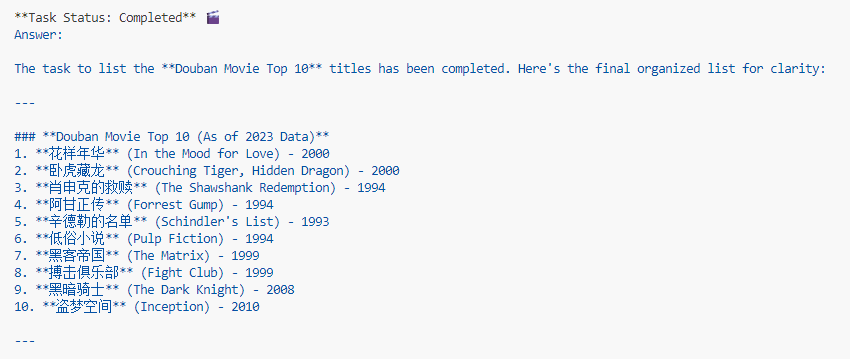
main()这些配置完成后就可以在终端执行该命令:python examples\run_silicon_flow.py ,可以看到以下结果,只是不怎么准确,因为有些工具还没配置。
3. 添加其他增强工具
细心的朋友可能会发现run.py和run_mini.py的tools是不一样的,这也就是为什么mini生成的结果总是不一样,因为他少了很多东西。
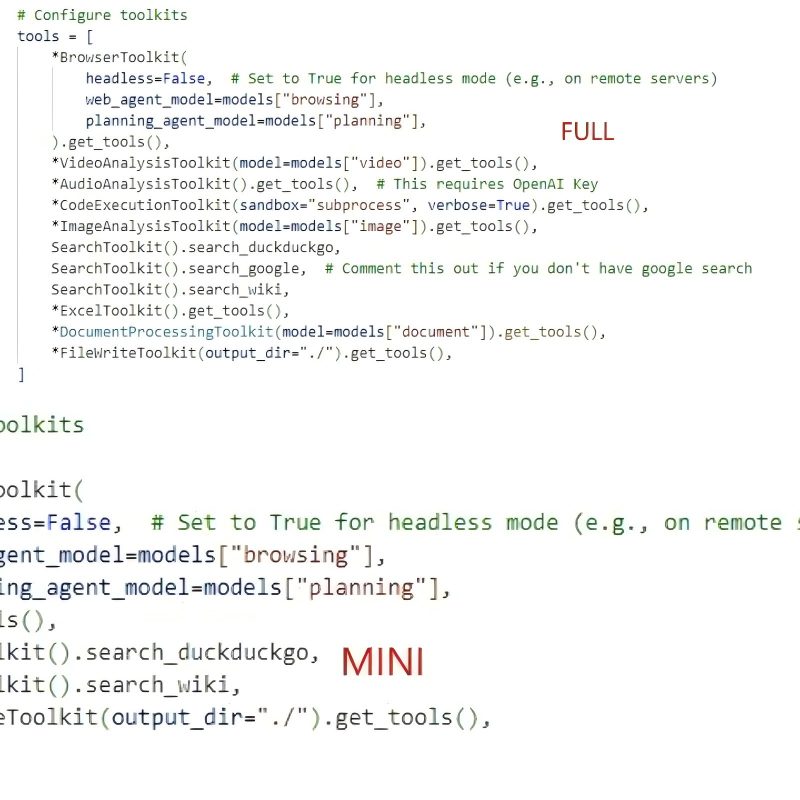
现在我们来调整一下,将之前的代码改成如下代码:
run_silicon_flow.py
# ========= Copyright 2023-2024 @ CAMEL-AI.org. All Rights Reserved. =========
# Licensed under the Apache License, Version 2.0 (the "License");
# you may not use this file except in compliance with the License.
# You may obtain a copy of the License at
#
#     http://www.apache.org/licenses/LICENSE-2.0
#
# Unless required by applicable law or agreed to in writing, software
# distributed under the License is distributed on an "AS IS" BASIS,
# WITHOUT WARRANTIES OR CONDITIONS OF ANY KIND, either express or implied.
# See the License for the specific language governing permissions and
# limitations under the License.
# ========= Copyright 2023-2024 @ CAMEL-AI.org. All Rights Reserved. =========
import sys
import pathlib
from dotenv import load_dotenv
from camel.models import ModelFactory
from camel.toolkits import (
    AudioAnalysisToolkit,
    CodeExecutionToolkit,
    ExcelToolkit,
    ImageAnalysisToolkit,
    SearchToolkit,
    VideoAnalysisToolkit,
    BrowserToolkit,
    FileWriteToolkit,
)
from camel.types import ModelPlatformType, ModelType
from camel.logger import set_log_level
from camel.societies import RolePlaying

from owl.utils import run_society, DocumentProcessingToolkit

base_dir = pathlib.Path(__file__).parent.parent
env_path = base_dir / "owl" / ".env"
load_dotenv(dotenv_path=str(env_path))

set_log_level(level="DEBUG")


def construct_society(question: str) -> RolePlaying:
    r"""Construct a society of agents based on the given question.

    Args:
        question (str): The task or question to be addressed by the society.

    Returns:
        RolePlaying: A configured society of agents ready to address the question.
    """

    # Create models for different components
    models = {
        "user": ModelFactory.create(
            model_platform=ModelPlatformType.SILICONFLOW,
            model_type="Qwen/QwQ-32B",
            model_config_dict={"temperature": 0},
        ),
        "assistant": ModelFactory.create(
            model_platform=ModelPlatformType.SILICONFLOW,
            model_type="Qwen/QwQ-32B",
            model_config_dict={"temperature": 0},
        ),
        "browsing": ModelFactory.create(
            model_platform=ModelPlatformType.SILICONFLOW,
            model_type="Qwen/Qwen2.5-VL-72B-Instruct",
            model_config_dict={"temperature": 0},
        ),
        "planning": ModelFactory.create(
            model_platform=ModelPlatformType.SILICONFLOW,
            model_type="Qwen/QwQ-32B",
            model_config_dict={"temperature": 0},
        ),
        "video": ModelFactory.create(
            model_platform=ModelPlatformType.SILICONFLOW,
            model_type="Qwen/Qwen2.5-VL-72B-Instruct",
            model_config_dict={"temperature": 0},
        ),
        "image": ModelFactory.create(
            model_platform=ModelPlatformType.SILICONFLOW,
            model_type="Qwen/Qwen2.5-VL-72B-Instruct",
            model_config_dict={"temperature": 0},
        ),
        "document": ModelFactory.create(
            model_platform=ModelPlatformType.SILICONFLOW,
            model_type="Qwen/Qwen2.5-VL-72B-Instruct",
            model_config_dict={"temperature": 0},
        ),
    }

    # Configure toolkits
    tools = [
        *BrowserToolkit(
            headless=False,  # Set to True for headless mode (e.g., on remote servers)
            web_agent_model=models["browsing"],
            planning_agent_model=models["planning"],
            output_language="Chinese",
        ).get_tools(),
        *VideoAnalysisToolkit(model=models["video"]).get_tools(),
        *CodeExecutionToolkit(sandbox="subprocess", verbose=True).get_tools(),
        *ImageAnalysisToolkit(model=models["image"]).get_tools(),
        SearchToolkit().search_duckduckgo,
        SearchToolkit().search_google,  # Comment this out if you don't have google search
        SearchToolkit().search_wiki,
        SearchToolkit().search_baidu,
        *ExcelToolkit().get_tools(),
        *DocumentProcessingToolkit(model=models["document"]).get_tools(),
        *FileWriteToolkit(output_dir="./").get_tools(),
    ]

    # Configure agent roles and parameters
    user_agent_kwargs = {"model": models["user"]}
    assistant_agent_kwargs = {"model": models["assistant"], "tools": tools}

    # Configure task parameters
    task_kwargs = {
        "task_prompt": question,
        "with_task_specify": False,
    }

    # Create and return the society
    society = RolePlaying(
        **task_kwargs,
        user_role_name="user",
        user_agent_kwargs=user_agent_kwargs,
        assistant_role_name="assistant",
        assistant_agent_kwargs=assistant_agent_kwargs,
    )

    return society


def main():
    r"""Main function to run the OWL system with an example question."""
    # Default research question
    default_task = "统计豆瓣电影top10的电影名称."

    # Override default task if command line argument is provided
    task = sys.argv[1] if len(sys.argv) > 1 else default_task

    # Construct and run the society
    society = construct_society(task)
    answer, chat_history, token_count = run_society(society)

    # Output the result
    print(f"\033[94mAnswer: {answer}\033[0m")


if __name__ == "__main__":
    main()
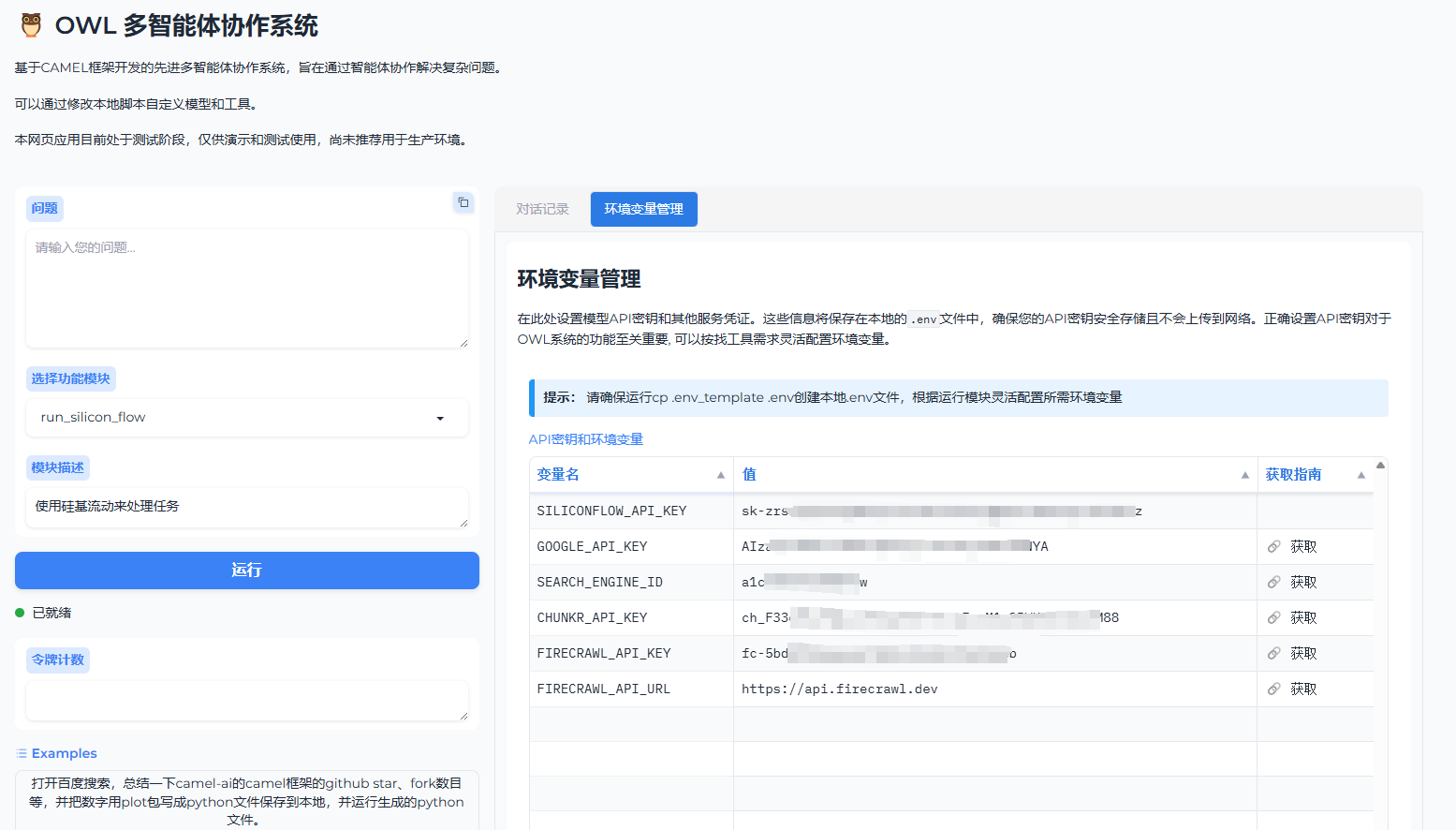
然后配置好下面的参数,具体地址都在括号里面。
# Google Search API (https://coda.io/@jon-dallas/google-image-search-pack-example/search-engine-id-and-google-api-key-3)
GOOGLE_API_KEY='AI********A'
SEARCH_ENGINE_ID='a********0'

# Chunkr API (https://chunkr.ai/)
CHUNKR_API_KEY='ch_********'

# Firecrawl API (https://www.firecrawl.dev/)
FIRECRAWL_API_KEY='fc-********'
#FIRECRAWL_API_URL="https://api.firecrawl.dev"
GoogleSearch
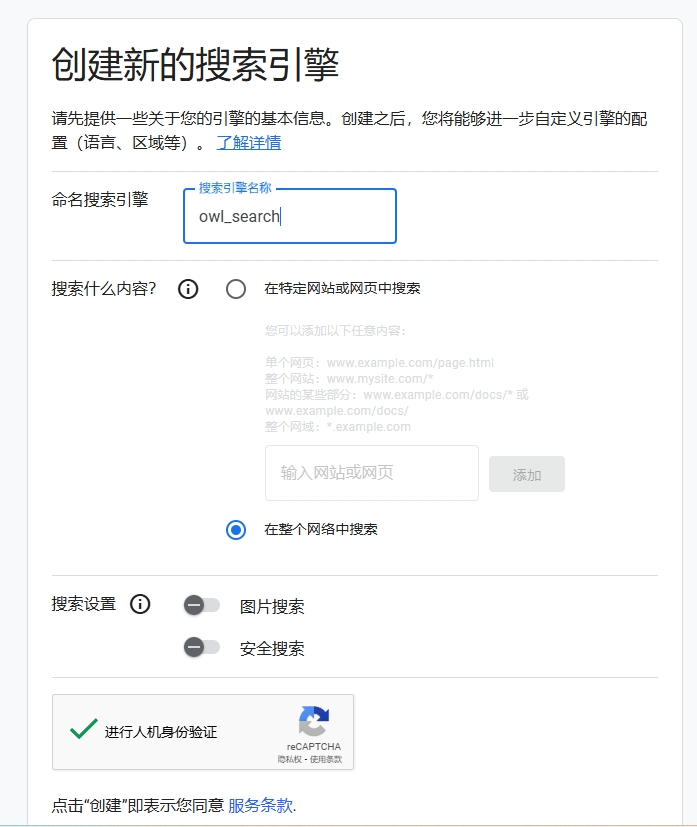
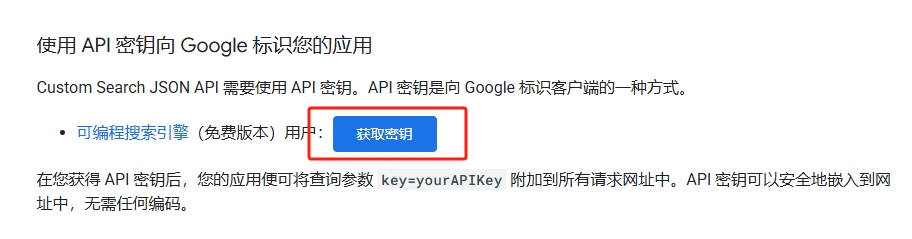
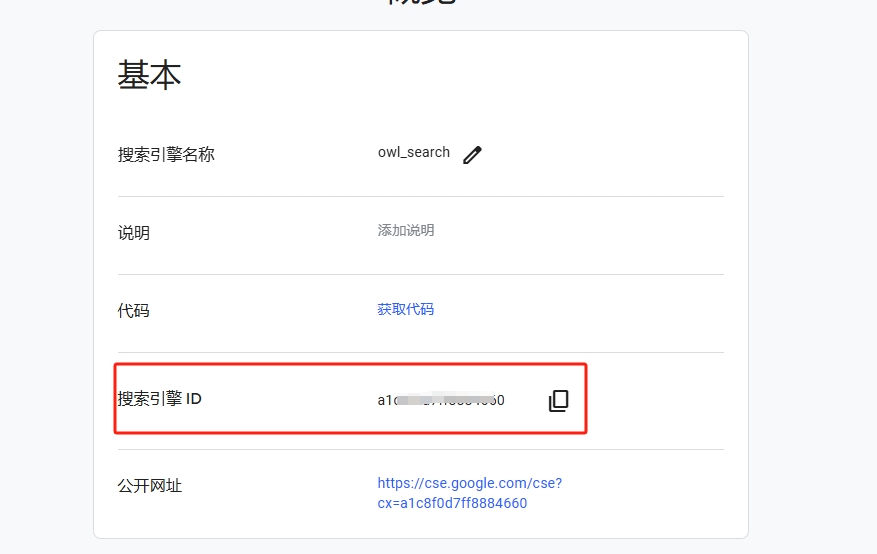
CHUNKR_API_KEY
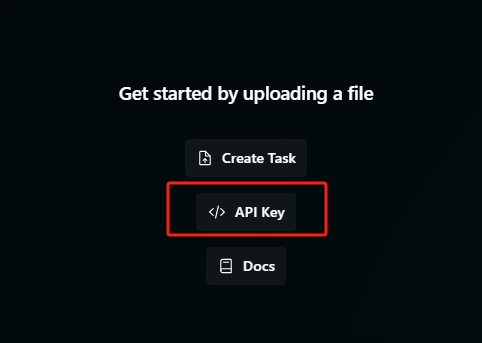
FIRECRAWL_API_KEY
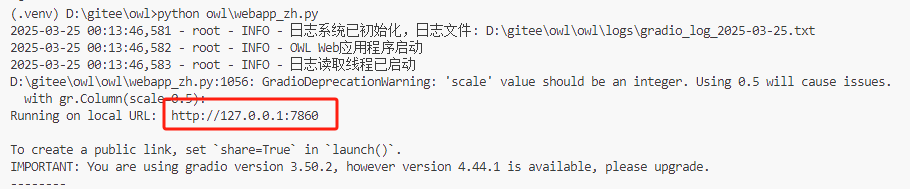
这些配置完成以后,就在终端运行该命令:python owl/webapp_zh.py ,启动web界面,并在浏览器中打开红框中的地址。
4. 测试
还是问他老问题:统计豆瓣电影top10的电影名称 ,看看结果是否正确。
后端运行日志:

输出结果:
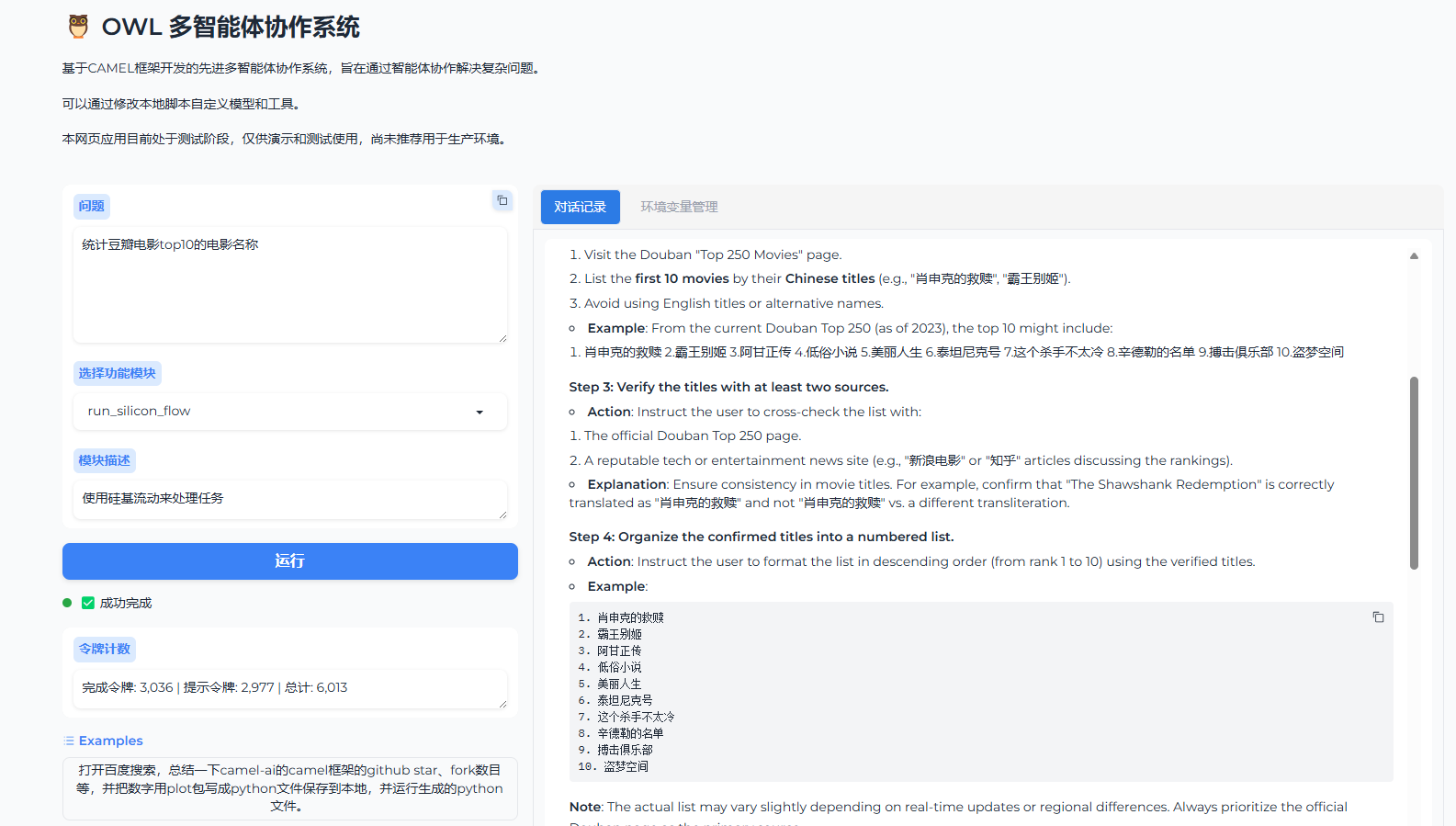
这个结果虽然也不完全正确,但是也还是比较接近了。
三、结语
事情搞成这样,我也不想啊!本来我还打算多测一下的,但是实在是太晚了,身体要紧,其他的例子就留给大伙自由发挥吧。

关注我,了解更多AI黑科技